Mike's IRTF Guiding Pro Tips
(Staying pointed in the right direction)
Offsets vs. Pointing Map
Offsets: This is a change in what RA and dec you want the telescope to be pointing to. Example: We’re observing, and we want to move the star along the slit. We send a TCS offset to move the telescope, in the sense that we want the center of the field to be at a different RA and dec. Similar for dithering.
When an offset is applied, it’ll move the MORIS/MOC guide box. We want MORIS/MOC to follow the star as the instrument (i.e. SpeX or MIRSI) commands a beam switch or a dither. If the target has drifted out of the guide box, DO NOT use offsets, as you’ll end up chasing the guide box as it’ll keep moving away from you.
Pointing Map: This is a change to where the telescope should be to point at a specific RA and dec. Example: Guiding sends updates to the pointing map, since we want the telescope to stay pointed at the same RA and dec, but we need to send commands to the motors to do that.
Use pointing map offsets when guiding by hand, or to put the target back into the guidebox if it has drifted out. For example, when observing a faint asteroid, we set ‘CorrectTo’ to ‘Off’ when a bright star comes by so that the guider doesn’t pick up on the bright star. In the time that the target is passing over the star, the target can drift out of the guide box. In this case, use pointing map offsets (ptmap in T3Remote) to nudge the target back into the guide box without moving the guide box.
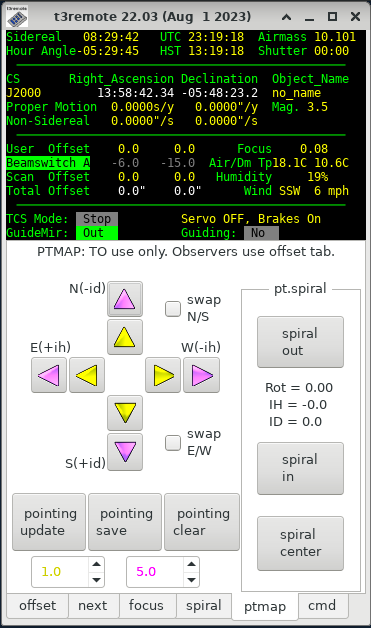
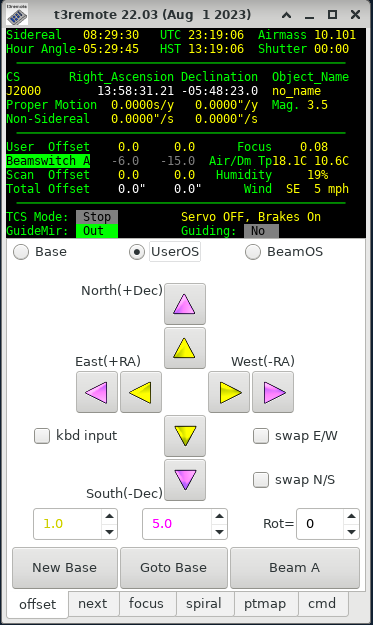
Figure: Left: Pointing map paddle. Right: Offset paddle.
Adjusting Guide Rates
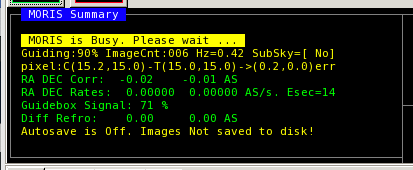
Figure: This is what you'll see in the MORIS Summary box once you start guiding.
The first green line "RA DEC Corr" shows the most recent corrections.
The second green line "RA DEC Rates" shows the rates that have been calculated from the corrections. "Esec" is the time over which those rates have been averaged.
"Esec" is the time over which those rates have been averaged.
This graph shows the last 6 minutes of guiding corrections, and the calculated drift rates over the last 2, 4 and 6 minutes. If the data are not centered on 0, then there is a drift that can probably be brought down.
https://irtfweb.ifa.hawaii.edu/~tcs3/related/ptpeak_graph/
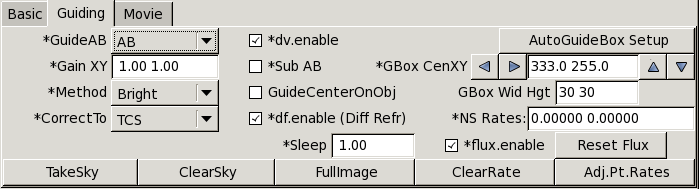
Figure: The MORIS guiding tab. The rates buttons are to the lower right.
To remove the drift:
1) Click on ‘ClearRate’
2) Let the guiding accumulate a few minutes of data. Check the plot above.
3) Click on ‘Adj.Pt.Rates’. That will send the calculated rate offset to the TCS.
Focus Offsets